
You can add campaign results in three ways: type them in, paste them from a spreadsheet or import a file. Connected ad accounts load their numbers automatically every day.
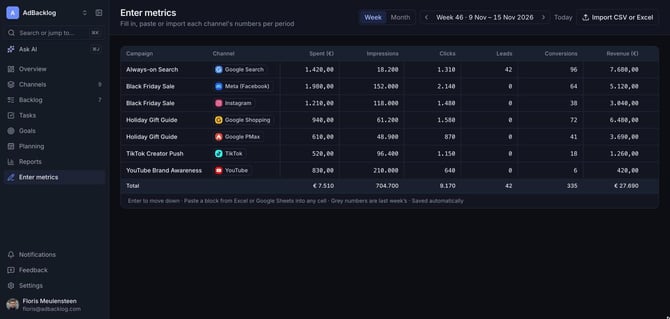
Type or paste your numbers
- Open Enter metrics in the sidebar.
- Choose Week or Month and pick the period.
- Fill in spend, impressions, clicks, leads, conversions and revenue per campaign and channel.
- Press Enter to move to the next row.
- Paste a block from Excel or Google Sheets into any cell to fill several cells at once.
- Grey numbers are last period's values, as a reference.
- Everything saves automatically.
Import a CSV or Excel file
Click Import CSV or Excel and upload an export from any ad platform. AdBacklog matches the columns to spend, clicks, conversions and revenue.
Load numbers automatically
Connect your ad accounts under Settings > Integrations to load spend, clicks and conversions every day. See How do I connect my ad accounts?
Derived KPIs
From these numbers AdBacklog calculates CPM, CTR, CPC, CPL, CPA, ROAS, ROI and profit. You can add your own KPIs, such as cost per demo, under Settings > KPIs.